


Please note the icon for switching to various views. Clicking on this icon opens a popup menu in which you can choose what you would like to see:
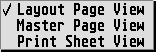
The current viewing mode is shown ticked in the popup menu. You can select another one just by clicking on a new viewing mode entry.
This icon is the only method of recording a viewing mode switch as a macro!
It provides a fast and easy way to switch from the normal document
page to the master page or to a print preview, so that you can
continue to work in the corresponding mode. Further details about the
functions of master pages and their editing can be found in the
chapter Page module, Master page editing
.
