This site is designed to take advantage of CSS. If you are seeing this, CSS must not be available or enabled in your browser. Everything should still work, but won't be as pretty. :)


RTF format support
The RTF format instructions are mostly reflected in the Calamus
text frame by text rulers and text styles accordingly. So the import
of RTF-ImEx offers maximum possible approach to the original
formatting of the RTF format:
- Tables (with tabulators):
Calamus doesn't have a table management already. Thus RTF-ImEx has
to use the available Calamus text frame elements when it interprets
RTF tables. It realizes this by separating text from within RTF table
cells (see below) by tabulators. Even empty cells are considered.
- Cell
-
A cell is a table area which is defined by a column and line.
Such a cell can even contain multiple line text (e.g. in MS Word and
Papyrus). These formattings are lost after import (due to missing
table functions in Calamus). The whole text of a cell will be output
in a single text line and separated from the preceding and following
cell with tabulators.
- Footnotes:
Footnote texts are directly coded in the text frame piping so you
can use the common Calamus technique to manage these footnotes. Here
is how:
- Create a normal text frame and import the RTF text into it.
- Now create another text frame, best in the place where the
footnotes should be output later. To inform Calamus that this frame
should be a footnote text frame, assign the attribute
Footnote text
frame
. Therefore select the frame and choose the function group
Special functions for text frames
in the Frame module. There
you find an icon group for text frame attributes in the upper part,
where you click the icon Footnote text frame
.
- Now pipe the text frame with the footnote text frame. (If the
main text frame is already part of a text frame piping chain, pipe the
first frame of the text frame piping chain to the footnote
text frame.
- In the Options menu, choose the menu entry
Recalculate
text
.
- A dialog is shown where you please select
Footnotes
and
adjust the parameters as shown below.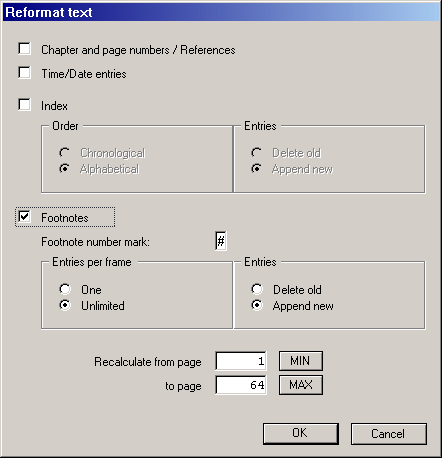
- Enumerations
- Various ASCII character sets (Unix, Windows, Mac, Atari, DOS,
etc.)
- Line distances and indentations
- Half quote and unquote marks
- Text styles (font size, underlined, shadow, etc.)
- Font exchange tables are stored in .FET files.
- Wrong files (no RTF format) are directly rejected.
Copyright © invers Software (Home)
Last updated on June 24, 2015


