


RTF files store the font name used by the program creating it, as well as the font type (if present), for each font. Various programs do this more or less cleanly: MS Word for instance always stores the complete font name, TempusWord only an abbreviation (Times becoms Tms) and with Papyrus Times becomes TIMES.
Based on this information, RTF-ImEx has to assign corresponding fonts to the imported text. In addition, most programs producing RTF are used on Macs and PCs and so normally don't use CFN fonts, but Type 1 fonts or TrueType fonts. These can be replaced during import into Calamus by CFN assignments, but also by other Type 1 or TrueType fonts (providing the corresponding font import driver has been loaded into Calamus).
It is just these tasks of RTF-ImEx that are controlled by the font exchange table.
The font exchange table is called by the corresponding icon in the function panel. A large dialog box opens, listing entries that are already present. In this, each line displays the names (separated by semicolons) that are assigned to one set of Calamus fonts.
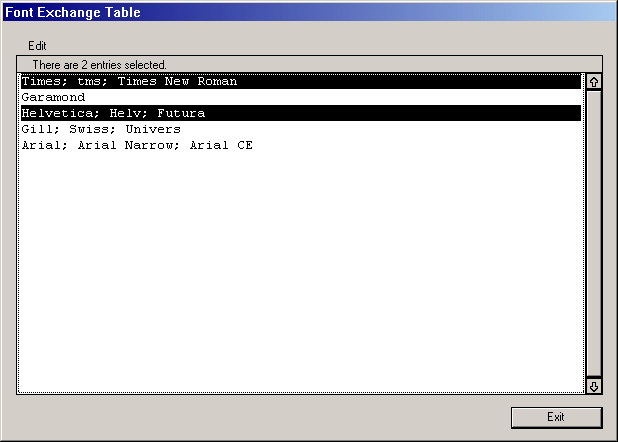
From the Edit menu all entries may be selected or deselected, or you can delete entries or create a new one.
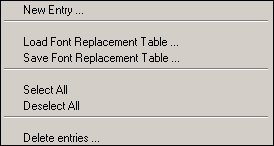
Hint: If you have selected some entries in the font
exchange table and choose Save font exchange table
, you can
save this selection as a new font exchange table.
A double-click on a list entry opens the font management dialog, so that the data may be altered if desired.
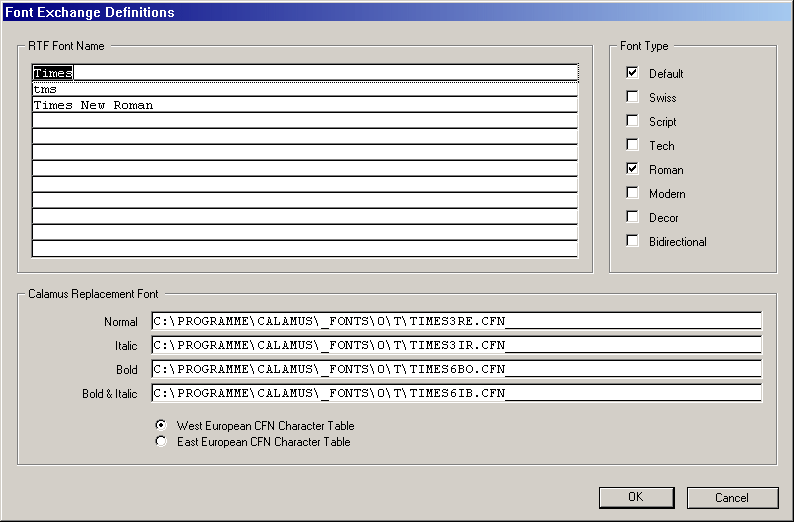
The same dialog appears (though empty) when you select New
entry
in the Edit menu.
In the font management dialog you can specify the parameters for a
set of CFN fonts. A CFN set consists of the four cuts or types:
Normal
, Italic
, Bold
and Bold-italic
. In
the Calamus font
box of the dialog, clicking on the
corresponding entry allows you to find a suitable matching font via
the file selector. If there is no entry for Italic
, the fonts,
if required, will be simulated by the Skewed
text effect in
Calamus.
In the lines of the RTF font name
box at the left side of
the dialog you enter the RTF fonts for which the CFN set should be
used. For this RTF fonts that just include the specified keywords will
be recognized as well. Therefore the names should be as general as
possible. The entry times
is enough to ensure that the RTF font
Times New Roman
is replaced by the chosen CFN fonts. No regard
is paid to case, so you may, but need not, use capital letters.
Each dialog line may contain only one RTF font!
The checkboxes in the Font type
box can assign so-called
style elements to the CFN fonts. These style elements will be used by
RTF-ImEx in cases where no CFN set can be allocated based on the
keywords of the RTF fonts. The import driver then attempts to find the
closest possible set of CFN fonts.
The first checkbox, Default
, instructs RTF-ImEx to use this
CFN set always, even if an assignment is not possible from the style
elements. The first CFN set in the list will be used for which this
switch is set every time. If none of the checkboxes are switched on,
then the first font from the Calamus list will be used as an emergency
measure.
The font exchange table will be saved along the other settings of the driver. So if you want to retain any changes to the list permanently, it is necessary to click on the Save settings icon.

