This site is designed to take advantage of CSS. If you are seeing this, CSS must not be available or enabled in your browser. Everything should still work, but won't be as pretty. :)


Import parameters
A description of the import parameters follows:
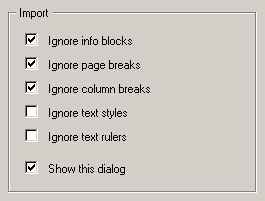
- Ignore Info blocks
-
The information block of an RTF file will be left as a comment
in the text if you do not activate this checkbox.
- Ignore page breaks
-
- Ignore column breaks
-
If you activate these checkboxes (so that they are crossed),
then the corresponding information in the RTF document will be
ignored, which can greatly alter the appearance of the imported data:
Calamus will not break the text to the next piped page or column frame
even if a new page or column was marked in the RTF document with a
\page
or \column
command, but continue until the frame
is filled (or the end of the text is reached). Note that if there was
no end-of-paragraph \par
in the text at the break position,
then none will apear there in the Calamus frame either.
If they are not active (i.e. uncrossed), a fixed break to the next
piped frame will be inserted at the corresponding positions.
We recommend that you first perform a test run with a smaller RTF file
in order to see how it behaves during import.
Note: Most programs (including MS Word and Papyrus for
instance) normally do not write their column or page breaks into the
file automatically, but flow
the text so that is piped from the
end of one column to the next column or page (as you are used to with
multiple text frames in Calamus). During RTF export only explicitly
set forced
breaks will be taken into account, and it is these,
therefore, that the RTF Import driver can convert or ignore.
- Ignore text styles
-
If this entry is switched on, then all text styles contained in
the original RTF text will be
forgotten
during import. The
imported text will then contain only a single text style, namely the
current style of the text frame.
- Ignore text rulers
-
Activate this entry if you want to ignore all text rulers that
the RTF import creates. In some cases this can lead to faster and
better results.
- Show this dialog
-
If you believe that all the parameters you have set are correct
for all occasions, then switch off this checkbox. In that case the
dialog will no longer appear at the next RTF import attempt.
Copyright © invers Software (Home)
Last updated on June 24, 2015


