This site is designed to take advantage of CSS. If you are seeing this, CSS must not be available or enabled in your browser. Everything should still work, but won't be as pretty. :)
invers Software
 
HomeSettingsExport parametersWhere is the settings dialog now?
  RTF-ImEx > Function reference > Settings Index

Text style information

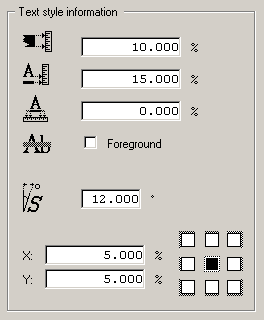
Last but not least – the adjustable text style parameters for import:
Underline
You can assign global parameters during import to underlines in the RTF document. These parameters are:
  • Underline width
  • Underline offset
  • Underline overhang
  • Underline in foreground/background

Skew
You can define a global value here for the electronic skewing (mock italicisation) of fonts in the imported RTF document. This has nothing to do with the font definition of italic replacement fonts!


Shadow
You can assign to the RTF document a global setting for shadowing during import – both direction and offset.


Hint: In all cases the percentage values refer to the font height currently set in the Font size function panel of the Text style module.


Copyright © invers Software (Home)
Last updated on June 24, 2015

HomeSettingsExport parametersWhere is the settings dialog now?
top top

© 1998–2026 invers Software. All rights reserved. | Privacy
| Did you find translation errors in this page?