


After a click on this icon, a dialog opens and offers some global parameters to be adjusted for the work with Calvin:
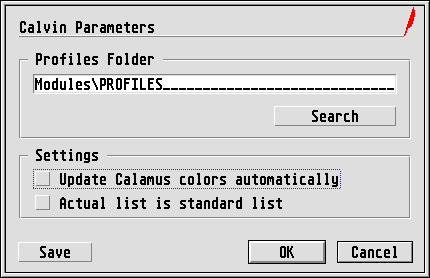
After Calvin is installed, you should click on the button
Browse
and define the folder where Calvin profiles should be
found by default. We recommend to create a new folder named
Profiles
. (We usually put this folder in the MODULES folder.)
This is important for several reasons: First of all, you will be able
and collect a big bunch of different profiles by the time which should
not mix up your modules folder or, even worse, cannot be found any
longer. Much more important is that Calvin only looks into the defined
folder whenever you (re)load profile lists.
There are two additional options:
This feature adjusts the screen colours in Calamus
automatically whenever you switch back from another application (e.g.
jinnee
, an alternative TOS desktop which changes screen colour
palettes). Until now, switching from Calamus to the desktop jinnee
caused extreme redraw problems (Calamus document windows showed wrong
colours then). You had to tidy up the Calamus screen by pressing
[ClrHome] afterwards.
If this option is set, a click on the Save
button in the
settings dialog saves a list file named DEFAULT.CPL
into the
defined profile folder, listing the currently loaded profiles. Calvin
looks for this default file after being started and loads the list and
the according profiles automatically.
Furthermore, the Save
button stores the current settings of
Calvin in a standard Calamus setup file named CALVIN.SET
into
the modules folder.
