


To load individually saved pages, click first on the icon. The normal file selector will appear to let you select a file name. When you select a file containing Calamus pages (*.CSE), the following dialog box will appear:
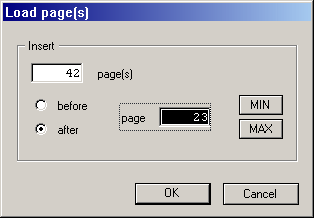
You have to enter where the pages should be inserted in the
document. By default, they will be placed immediately after the page
you are currently working on. If you want pages to appear at the
beginning of the document, click on the Before
button and enter
the number 1
.
We should repeat here: Generally this number is the page number which appears in the top bar of the document window, and is not necessarily the number which will be printed on the page.
Every time you load a Calamus page, you also load the master page
that governs it. There might already be a master page of the same name
in your document, in which case see Two elements with same
name
.
If you are using double-sided documents, problems can arise with
the sequence of left and right pages. The reasons for this and
possible solutions are described in the section Double-page
problem
above.
