


When you click on this icon, the RTF import process will start. For this a normal text frame has to be selected beforehand in which the text is to land up.
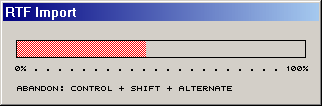
While the driver is importing and interpreting the data, you will see a growing bar that indicates the progress of the import function. You can terminate the process at any time by pressing the key combination [Ctrl]+[Alt]+[Shift].
Once the RTF document is loaded completely, it will be displayed immediately in the text frame. Naturally it is quite possible that the text frame does not have the optimum dimensions as yet to display the data correctly.
It is also possible that you have to create further text frames and arrange text flow from frame to frame (piping) so that the text flows to the following frame(s). – You should be familiar with all these text frame operations from the Calamus manual and your daily working with the program.

