


With this function, all selected objects can be rotated. Select one or more objects or groups of objects and click on this icon.
If you now click on the selected objects in the document window with the mouse, and keep the mouse button pressed, you can change the angle of rotation of the object (relative to the object center) by moving the mouse arrow. An auxiliary circle shows you the changes. Additionally, the current angle of rotation is shown in the coordinates bar.

When you have decided on an angle, press the left mouse button. All selected objects or groups of objects will now be rotated to the selected angle.
To leave the function and return to the object, you can either click the icon again to deactivate it, or click the right mouse button.
It is also possible to set the angle directly by clicking into the coordinates bar. A dialogue box appears where you can manually enter an angle.
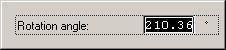
The angle entered in the dialogue is applied to the object when [Return] is pressed.
