If your document uses double pages, there will be pages that will
lie on the left side when you open the book etc., and those that lie
on the right. If you add or delete a page (or an odd number of pages)
within a document, the problem arises that there will then be two left
(or two right) pages following each other. This can also happen in
other cases, for instance when you import another document into your
document (see File menu, Merge
) and this also contains double
pages. In that case the following error message will appear:
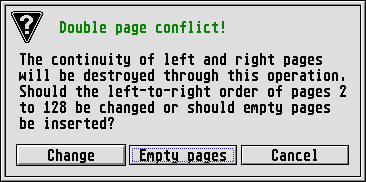
Here you can decide whether to [Cancel] the function or click on
Empty pages
to insert one of these. The added page will always
be adapted to the current format. After adding an empty page the
position of the left and right pages will be correct once more, but
there will be an empty, white page between them. If you select
Change
, on the other hand, Calamus will make sure that there
are no blank pages and there is still a regular alternation between
left and right pages. But changing the page order may destroy a
carefully constructed layout. Depending on the situation you should
therefore think very carefully which of the two options you choose. In
case of doubt, there is still the emergency brake: Just click on
[Cancel] and everything will stay as it was.
When you insert or delete an odd number of pages in your document, this dialog box will even appear twice: Then you must decide what to do at the beginning of the added pages, and what to do at the end.
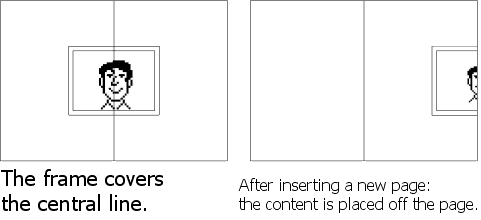
There is another problem when working with double pages: You can of course also place frames over the central divide or fold. These frames will then lie partly on the left and partly on the right page. If you insert a page between the two, then the double page will be pulled apart – the overlying frames have to be divided. Calamus assigns the frame to the page which contains its centre point. If, for example, 2/3 of the frame appears on the left page, Calamus will assign the frame to the left page. When you insert a new right page, Calamus will keep the frame on the old left page, but extending outside it to the right, so 1/3 of it lies on the new right page. If you later restore the original page division, the frames will naturally lie over the central divide once more. The order in which they were previously arranged on top of each other will be lost, however. This rather hypothetical situation should occur only in the rarest of cases.
The two effects described can even occur together. In that case an annoying situation arises that you should be aware of: If a left page becomes a right page and if this old left page contains a frame that extends over the central divide/fold, then after conversion to a right page it will of course lie partly outside the document. This is shown in the illustration: