


With this function you can set the page format for the current document. When you click on the corresponding icon, the following dialog box will appear:
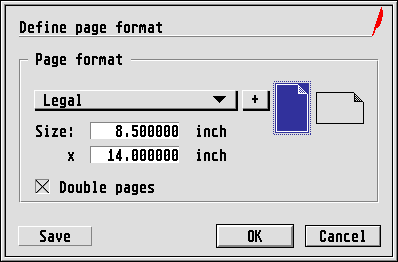
In the top popup you can select the page size for the current
document. In addition to various DIN formats there are also four
standard North American sizes among others. The adjacent icons allow
you to decide whether page orientation will be Portrait or Landscape.
(Most printers process paper vertically. For a horizontal document,
the entire output must be rotated 90 degrees. In graphic mode, which
Calamus uses, this is not a problem.) The page size resulting from the
chosen values is also displayed, where height and width will be
swopped over if you work in Landscape mode. If the page size you want
is not listed (Murphy's Law!), you can define one by clicking on and
editing the values in the Size
fields, in which case the popup
will show User-defined
. If this defined size is to be used in
Landscape format, then the width (upper value) must be greater than
the height; there is no need to switch orientation with the
Portrait
/ Landscape
icons.
Furthermore by clicking on the small +
button, you can open
a further dialog box in which you can extend the list of available
page formats by clicking on the New
button and entering the
desired name and size in the editable fields. You can also alter the
page format names for the popup with the Change
button or use
Delete
to remove existing selected entries. Clicking on
Save
in the main dialog stores the amended page format list so
it is available next time you launch Calamus.


A word about the European DIN sizes: You will know that by folding
a DIN A4 page in half you will get two DIN A5 pages. In a similar way,
two A4 pages fit into an A3 page, etc. The ratio of height to width is
always root-2 : 1
. The area of an A0 sheet is defined as
exactly one square metre. This results in the following formats, which
are however rounded off in practice:
| Format | Width | Height |
| DIN A0 | 84.0 cm | 118.8 cm |
| DIN A1 | 59.4 cm | 84.0 cm |
| DIN A2 | 42.0 cm | 59.4 cm |
| DIN A3 | 29.7 cm | 42.0 cm |
| DIN A4 | 21.0 cm | 29.7 cm |
| DIN A5 | 14.8 cm | 21.0 cm |
The series of DIN B formats is built up in a similar way, except that the B0 sheet has a size of exactly 100 x 141.4 cm.
The standard North American sizes are Letter, Legal, Double and Half; their measurements are given in inches. A letter-size page is twice the size of a half-size page, and a double-size page is twice the size of a letter-size page. Legal-size pages are not proportionate to letter-size. A double-size page is the size of a tabloid newspaper page.
| Format | Width | Height |
| Half | 5.5 " | 8.5 " |
| Letter | 8.5 " | 11.0 " |
| Double | 11.0 " | 17.0 " |
| Legal | 8.5 " | 14.0 " |
Next, you can decide whether you would like to work with single or
double pages. Books, magazines and brochures are usually laid out in
double pages, while flyers, posters, etc. are laid out in single
pages. When you select double pages, several things will happen: Each
page is marked as either a left page or a right page. Page 1 starts
out as a right page. If you change the position of page 1, the
position of all following pages will also change, and Calamus will
reassign layouts for left and right pages accordingly. To change page
1 from a right to left page, click on the Left
button in the
dialog box which appears after you set page format to Double page
mode. Be careful with this procedure as all header and footer
information will also change. There are also other consequences, which
are described below. Please read the following section carefully and
try to understand the cause of possible problems. You can save
yourself a lot of confusion that way.
