


The copying of pages is a combination of saving and loading,
except that it does not take up any mass storage (disk) space because
the temporary storage is internal in RAM. When you click on the
Copy page(s)
icon, the following dialog box will appear:
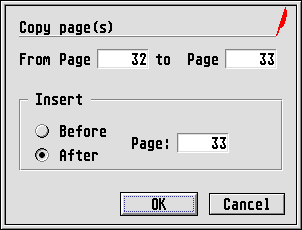
Enter the range of the pages which you want to copy in the From
page
and to page
editable fields. Then select the
destination of the copies by clicking on either the Before
or
After
radio button, where these refer to the value set in the
last Page:
editable field. Click on [OK] to perform the copy
operation.
Please bear in mind possible conflicts discussed in Double-page problems above.
