


As may be gathered from its name, this function allows you to save
single or multiple pages to hard or floppy disk. A page consists of
all the frames contained thereon, including the contents of those
frames, as well as the associated master page. When you click on the
Save page(s)
icon, the following dialog box will appear:
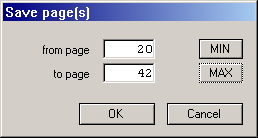
Operation is quite simple: If you only want to save the currently
displayed page (with its master page), you just need to click on [OK]
or press [Return]. Otherwise you must specify the page(s) to be saved.
Note that these numbers refer to physical pages as shown in the top
bar of the document window, which is generally not identical
with the page number that the page numbering function will insert in
the text! When the file selector appears, enter a filename for the
saved page. Calamus pages use a CSE
extender.
