


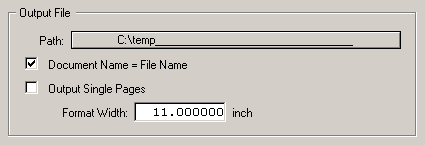
As PDF Print generally outputs to a file, at some stage you have to define the path that the printer driver is to write the PDF file(s) to. Click on the "Path" line and select the desired drive path.
Warning: If you choose a drive that is not available at all times (e.g. interchageable media drives) then it is possible that under MagicMac and MagicHades Calamus may crash. The reason is that these platforms unfortunately do not return messages about missing drive media to Calamus. The problem does not arise on other platforms.
Generally you can define a new PDF filename for each output, or use the "Document name equals Filename" switch to avoid being asked for a name each time. If this switch is set then for example a document name Example.CDK generates the PDF name Example.PDF.
In addition you can specify that the "Format width" of a PDF output file is not to exceed a given width. This is of interest particularly for imagesetting. If you output, say, on a Linotype Recorder 300, its film width of around 30.5 cm is rather limiting. Inadvertently exceeding this printing width in the PDF document could give rise to problems.

