


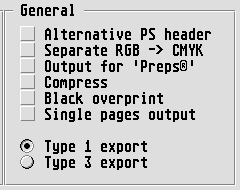
Here there are various checkbox switches that are intended for special cases:
In a very few cases it may be necessary to replace the standard PS header created by Bridge with a customized header you produce yourself (with a *.PSH file extender). In order to let Bridge use this PS file, it has to be in the same folder where the Bridge module is placed (normally the MODULES folder). In addition the filename has to be DEFAULT.PSH.
If this switch is set, all RGB colours of your document which are not part of a raster image will be separated to CMYK on output. If you have set up a colour separation control curve in Calamus, it will be used.
Preps is external imposition or mounting software that expects some special codings in PostScript files. If you want to impose your PS files with this software afterwards, please use this switch. Some required Preps PS commands will be output then as well.
Basically, you should have this switch on. If forces all PostScript output to be compressed best possible. Your PS files will become much smaller. If a PS processing program or RIP has problems with compressed PS files, you can output uncompressed PostScript data by switching this feature off here.
If this switch is set on, all black colour information from
vector based objects (text, lines, raster areas, vector graphics) will
be output to PostScript as if the write mode of the colour was
transparent
. Then e.g. a yellow area will not be cut out by
black text but stays intact and the black text will be simply printed
over it.
Chose this switch if you want a single PostScript file for each
document page. A four digit cypher will be added to your chosen output
file name and count upwards. A four page Test.CDK
will become
e.g. Test0001.ps, Test0002.ps, Test0003.ps, Test0004.ps
.
If the fonts used in the document are to be exported as well, they are embedded into the PostScript file. This prevents you from forgetting fonts when passing on the PS files, and also any accidental replacement of fonts by some other fonts directly in the RIP. At present PostScript supports two different font formats: Type 1 and Type 3. The Type 3 format was developed actually as an internal format only, just for embedding in PostScript files. The Type 1 format is the well known and widely used PostScript font format. Bridge can convert all fonts used in your document into one of these two formats during export.
If you want to convert your PS files to PDF in order to read these
files on-screen, we strictly recommend the Type 1 format. Then Acrobat
Reader can use the so-called hinting
technology in order to let
you read these fonts better on-screen.
If you have problems when processing PS files with embedded Type 1
fonts, you should try the Type 3 format as an alternative. As a rule
this allows fonts to be processed with far fewer problems, but they
are not as easy to read when viewed on a screen as the Type 1 fonts
mentioned above. No hinting
is available for Type 3 fonts.
Attention: Calamus converts all fonts used into another format on output. If you use third party fonts rather than CFN fonts, they will be converted into the CFN format on loading, too. This double conversion can cause differences which might prove unacceptable in processing, printing and reading on-screen. This problem can only be worked around by outputting your text in vectorized format or by selecting another font.
