


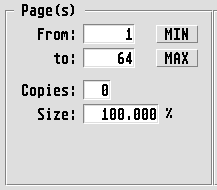
Here you can set whether just the current page, a given range of pages or all pages of the current document are to be exported. The setting is made as in the Calamus Print dialog.
If you want a page to be output more then once, enter the number
of copies in the Copies
editable field. If the value there
stays 0
, NO copies will be written, but only the original
pages.
If you want to output the pages in another size rather than
original, enter the desired percentage value in the field Size
.
If you want to reduce the paper format from e.g. A4 to A5, you will
have to enter 70.48 %
. To get A3 output from an A5 page size,
the value is 200.00 %
.
