


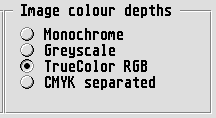
If you have not selected the switch Use raster image
colour depth
in the Raster graphics
part of the dialog, you
have to select a colour depth for all raster graphics here. This is
recommended if, say, you want to export a PDF file for a b&w printer.
Even if your document contains colour images, you should choose
Greyscale
in this case to avoid creating an unnecessarily large
amount of data. This also shortens the processing time before the PDF
file is printed.
Another sensible application is if the PDF files are only required
for screen display. In that case CMYK images are not much use, so
select the colour depth TrueColor RGB
.
