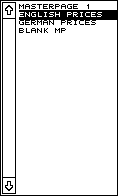
The top section of the Master page function group contains a list of master pages already available. Every document has at least one master page, which however is blank by default when starting a new document. If your document has more than 24 master pages, use the arrow icons or scroll bar to browse through the remainder.
To select a given master page to edit it, click on its name in the list.
You can rename a master page by holding down the [Alternate] key while clicking the left mouse button on the master page name.