


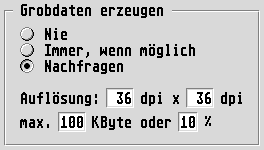
The parameters for Create coarse data
allow Tiffie to work
in cooperation with the Fine data manager: If desired, Tiffie loads
only the coarse data display of the TIFF file into the raster graphics
frame so as to reduce the amount of memory required. Via the special
fine data interface, the Fine data manager will later call Tiffie
automatically when fine data is requested – for instance for
imagesetting output or for picture modification with the Merge, Filter
or Paint modules. (You will find further information about working
with fine data under Coarse and fine data
.)
If the Fine data manager is not loaded, then no coarse data can be created. The settings in this part of the dialog will be ignored in that case and all TIFF images will be imported always at full resolution and data counts (amount of data).
The three choices for coarse data creation define when Tiffie should create a low resolution coarse data display of the TIFF file instead of the fine data (i.e. image data at the full resolution):
Even if the Fine data manager is loaded, no coarse data display will be created; all images will be loaded in high resolution every time.
If the Fine data manager has been loaded, the import of all TIFF images will create a coarse data placeholder with reduced amount of data.
With each import process a selection dialog appears asking whether coarse or fine data should be created for the relevant TIFF file.
In the lower part of the Coarse Data Parameters you can define by how much the resolution and the data count should be reduced when computing the coarse data. Tiffie takes care that none of the set limits is exceeded: For instance, 72 by 72 dpi, max. 100 KByte or 80 % will ensure that the coarse data image will always
If any of the parameters is set to 0
then the corresponding
restriction will be ignored. So it is possible, for instance, to use
Resolution=0, 0 KByte and 25 % to reduce the coarse data size
generally to one quarter of the original data size, irrespective of
the amount of data or the fine data resolution.
Incidentally, these settings are independent of those in the Fine data manager. So you can use other coarse data resolutions during import than for later lay-off of the fine data.

