


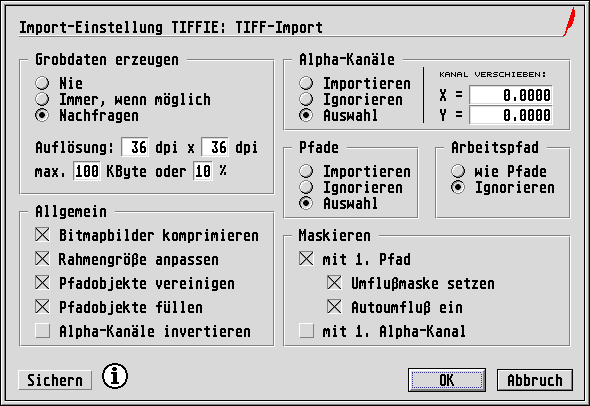
If you want to adjust the parameters of Tiffie's extended functions, hold down the [Ctrl] key while you call Tiffie from the Import dialog. The driver will then display its Settings dialog:
Note: Even if you have assigned a key binding with the
Macro Recorder to call Tiffie, you have to call Tiffie manually
while holding down the [Ctrl] key from the Import dialog in order to
be able to set the parameters. Otherwise the Macro Recorder would
activate the function that was programmed onto the same key with
[Ctrl] held down.
In the dialog you can click on the i
button to call up
Tiffie's Info dialog, in which you will find amongst others the
relevant version number and details about the authors.

Save
stores the current settings in the file
TIFFIE.SET
in the folder for Import/Export drivers. This file
will be read by Tiffie automatically when it is next launched, so that
the parameters will be available immediately.

