


It isn't hard to guess what this icon represents. If you click on it, the following dialog box appears on screen:
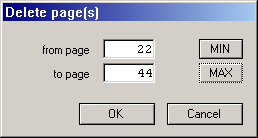
Enter the page or range of pages to be deleted. The default is the currently displayed page. Press [Return] or click on [OK], and the pages, including their contents, will be deleted permanently from memory.
The contents of text frames, however, will be deleted physically
and permanently only when the frames are not part of a piping chain.
If there is a piping link to the next page, the text will be moved to
the next frame. If this is not the case and the frame is at the end of
an existing piping chain, the text will be appended to the frame
previous to it. This previous frame will then be marked with the
overflow symbol +
to show that there is more text that is not
displayed anywhere.
When you delete an uneven number of pages from a double page-document, you may alter page layout and the conflicts described above in the Double-page problem section may occur.
